

Is your product ready for a small wholesale order?
Questions Muslim makers can answer before approaching a shop with a wholesale collection.
Plan a useful photo set for Muslim makers selling scarves, jewelry, books, or home goods.
A buyer looking at a scarf online cannot touch its surface or hold it against a jacket. A photograph has to carry some of that missing information. The strongest product set gives the buyer several kinds of evidence, including color, scale, texture, and what arrives in the package.
Etsy's product-photography guidance recommends planning the shoot, stabilizing the camera, showing different angles, and keeping the product visually clear. Its editing advice cautions that heavy manipulation can misrepresent an item's appearance. Those principles are useful for a maker's own website as well as a marketplace listing. Photography checklist · Editing guidance
Start with a clear overall view. A small thumbnail should still let a visitor identify the object. Next, show scale through a familiar setting or a measured diagram. Add a detail that reveals a material or construction feature. Finally, show the reverse, packaging, or another view that answers a likely pre-purchase question.
For a calligraphy print, the set might include the complete artwork, a close view of the paper, a photograph beside a ruler, and the print in its shipping sleeve. If a frame appears only as a styling prop, make that clear. For a scarf, demonstrate drape and texture while keeping the colors consistent across photographs.
Use a short shot list, then delete any view that adds no new information. This planning aid does not prescribe a photograph count.
| View | Question answered |
|---|---|
| Overall | What is the object? |
| Scale | How large is it? |
| Detail | What is the material or construction? |
| Reverse or opening | How does it work? |
| Package contents | What is included? |
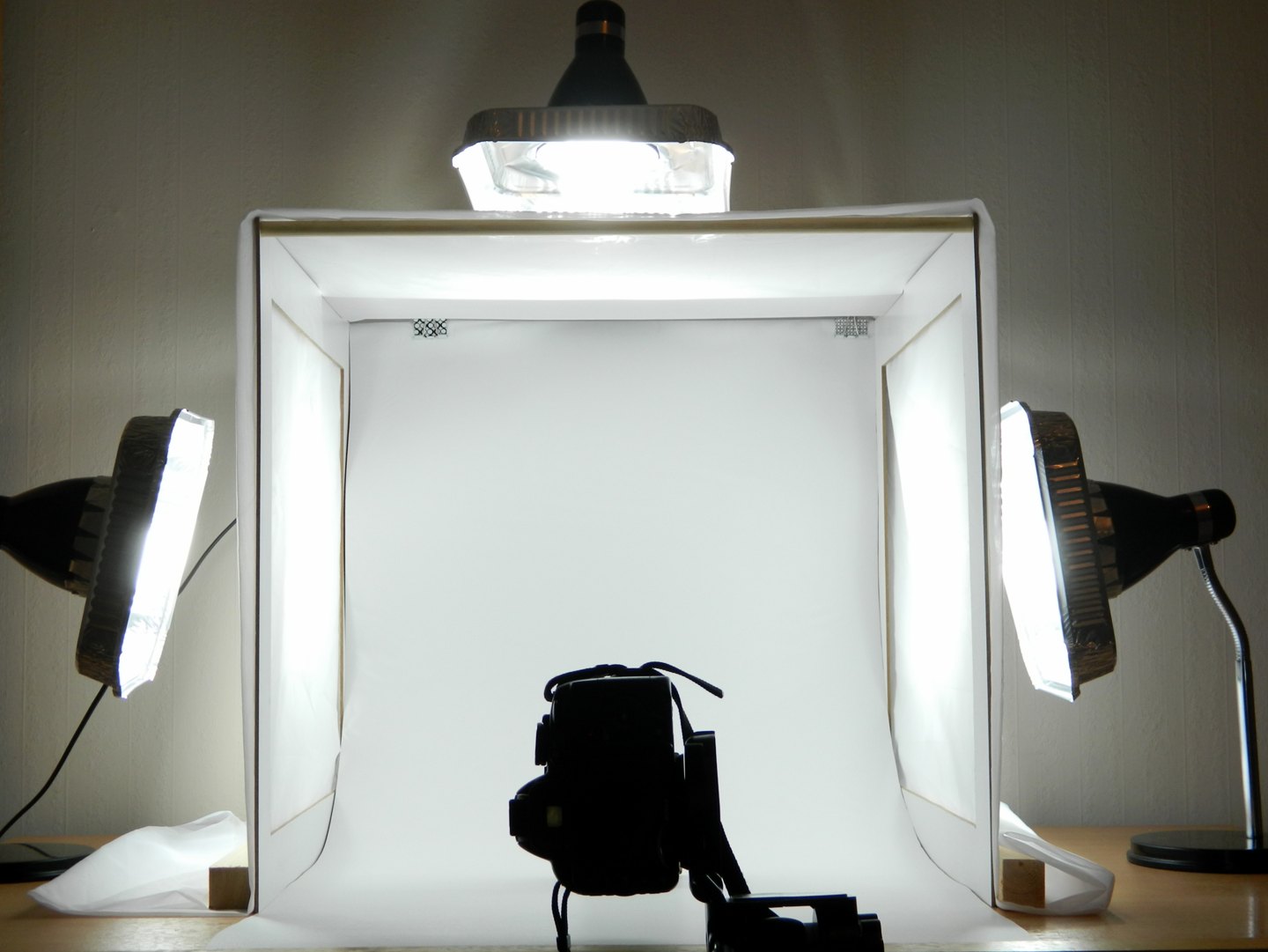
Choose a surface with enough space to keep the background uncluttered. Place the camera or phone on a stable support and make a note of its position. Use a test item to check the light before opening every product package. Consistency matters when customers compare several colors from the same collection.
Etsy recommends diffused window light and warns against mixing daylight with differently colored artificial light. Start with one consistent lighting arrangement before changing backgrounds or camera settings.
Keep a simple setup record. Include the background, camera height, light position, and the approximate time if daylight is part of the arrangement. A photograph of the setup itself can help you rebuild it later. This reduces the chance that the next batch of products looks as though it belongs to a different store.
Small details deserve attention. An embossed pattern may disappear when lit straight on, while an angled light can make its texture visible. A reflective metal surface can show the room instead of the finish. Test positions and look closely at the result on a larger screen before committing to the whole shoot.
For personalized products, use an example that demonstrates the choices without implying that every order will look identical. Show the area where a name appears and describe how lettering changes with length. If there are several sizes, photograph the differences clearly or add accurate dimensions next to each option.
Crop away unnecessary space, straighten the image, and correct obvious exposure problems. Compare the edited photograph with the object under ordinary viewing conditions. Check that dark fabric has retained its texture and that pale lettering remains visible. A dramatic filter may make a feed cohesive while making a product harder to judge.
Do not use generative editing to invent stitching, sharpen unreadable lettering into new text, or replace a surface with a more attractive material. If an edit changes what the buyer would receive, reshoot the item instead.
Save an untouched original and a separate export for the website. Use descriptive filenames that connect the image to a product and view. A filename such as a product code followed by “reverse” is easier to maintain than a camera's numerical sequence, especially when several people update the shop.
An image needs to work within the site's layout. Check the first photograph at phone size and in a square crop if the shop grid uses one. Place important details far enough from the edge that they survive the intended crop. Give supporting images captions only when the caption explains something a shopper needs to know.
Write alt text that identifies the product and the visible feature. A photograph of a blue scarf draped over a shoulder can be described directly. Repeating promotional phrases in alt text adds little information and makes the page more tiring for people using a screen reader.
After the listing has been used, collect questions buyers still ask. If they want to see the closure, add that photograph. If the most common issue is size, improve the scale image. The photo set can evolve as the maker learns how people evaluate the object.
Carry the same images into a wholesale line sheet where they help identify an order, or use the questions heard at a first market booth to decide which view is missing.
Questions Muslim makers can answer before approaching a shop with a wholesale collection.
A practical way to prepare products, signage, packing, and follow-up for a first community market.
A small research exercise for Muslim entrepreneurs testing a product or service idea.